by Oliver
15. September 2011 17:05
Today, I tried importing a CSV file like the following into one of our MS SQL Server databases:
Id;Latitude;Longitude
4610;43.7119;-1.0737
5502;49.4297;-1.806
11360;46.9343;-1.8875
I tried it using the following command line:
1: bcp GeoDataImport in geodata.csv -w -t; -T
but that threw the mentioned error:
“Unexpected EOF encountered in BCP data-file”
cmd> bcp GeoDataImport in geodata.csv -w -t; -T
Starting copy...
SQLState = S1000, NativeError = 0
Error = [Microsoft][SQL Server Native Client 10.0]Unexpected EOF encountered in BCP data-file
0 rows copied.
Network packet size (bytes): 4096
Clock Time (ms.) Total : 1
I’ve had this problem before and somehow managed to remember that it might have something to do with the encoding of the file. So I opened it with Notepad++ where you can easily check and change the file encoding and found it was ANSI encoded:
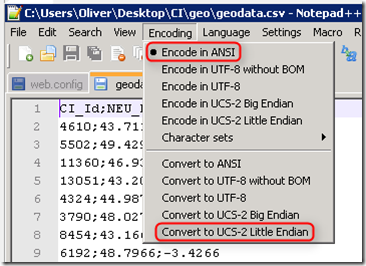
Well, the UCS-2 Little Endian encoding is what SQL Server expects as default encoding, so I changed the encoding, saved the file and imported it again – with success. UCS-2 might be something you rarely hear about – that’s because it’s been superseded by UTF-16 but in most situations they are pretty much identical (check out http://en.wikipedia.org/wiki/UTF-16/UCS-2 for more info).
That’s all for now – happy coding!